
Filters & presets
The feed shows everything by default. The controls above it let you carve that firehose down to the events you trade, then save the result so you never have to set it up twice.
 Source chips, sentiment toggles, and the filter row stack above the feed.
Source chips
The chips pick what kind of event you see: All, SEC, Press, Analyst, Insider, Inst., Govt. Tap one to keep just that source. Choose SEC when you're working filings, Insider when you're following Form 4 flow, Govt for congressional trades and contract awards. Each chip has its own page later in this section.
Sentiment toggles
Bullish, Bearish, Neutral show only the directional read you want. Hunting downside setups? Show bearish only. Some events come back Mixed when there's a case both ways. What the reads mean is covered in Impact, sentiment & score.
The filter row
- Exchange — limit to a listing venue.
- Form — isolate one SEC form type, like 8-K or Form 4. See SEC filings for which forms matter.
- Impact slider — drag it up to hide the small stuff and keep only events scoring above the level you set. This is the single most useful control on busy days. Read how the score works in Impact, sentiment & score.
- Date range — narrow to a window, useful after a weekend or a session you missed.
- Advanced — a panel for finer combinations when the chips and row aren't enough.
Presets
Once you've dialed in a combination you like, save it as a preset. Reload it any time in one click instead of rebuilding the same filters by hand.
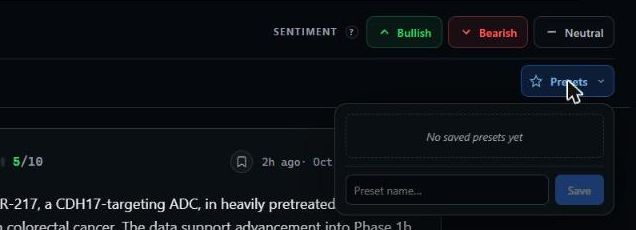 A preset stores a whole filter combination under a name you choose.
TIP
Build a few presets around how you actually trade: a high-impact "what moved" view, a Form 4 insider-buying view, and a congressional view. Switching between them takes one tap.
Next: put it to work in Reading the cards.