
Explore Stock
Explore Stock is the single-company page that pulls everything about one ticker into one place. You reach it from the Explore Stock button on any card, or straight from a Search result. Instead of jumping between feeds, you get the whole picture for a name on one screen.
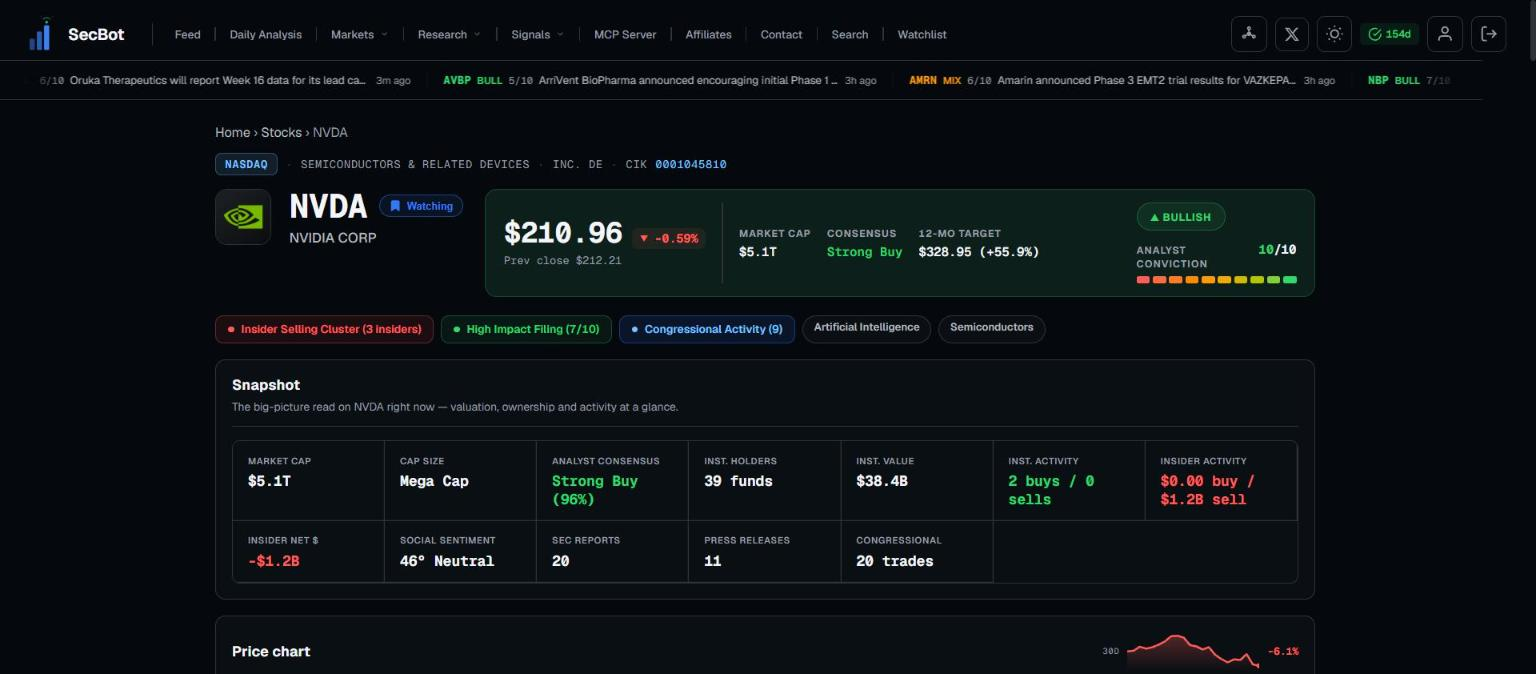 Everything for one ticker in one place.
What's on the page
The page gathers the pieces you'd otherwise chase across the platform:
- Price and chart — where the stock is now and how it's moved.
- Recent events — scored items from every feed, in one timeline.
- Filings — the company's SEC documents.
- Insider and institutional activity — who's buying or selling, from officers to large funds.
- Analyst coverage — ratings and targets on the name.
Everything sits together, so you can read price against events against ownership without losing the thread.
Using it
This is the page to open the moment a ticker catches your eye. Start with the recent events to see why it's moving, glance at insider and institutional activity for a read on positioning, then check analyst coverage for the outside view. By the time you've worked down the page you have the context to decide whether the name is worth more of your time.
Treat it as your home base for one stock. From here you can add the name to your watchlist and keep it in view from then on.
Related: Search.