Court Judgements
A court ruling can wipe out a patent, clear a deal, or hand a company a bill it can't ignore. The Court Judgements page collects SecBot report cards for legal decisions where a listed company is a party, and tells you which way each one cuts. You'll find it under Research in the app menu.
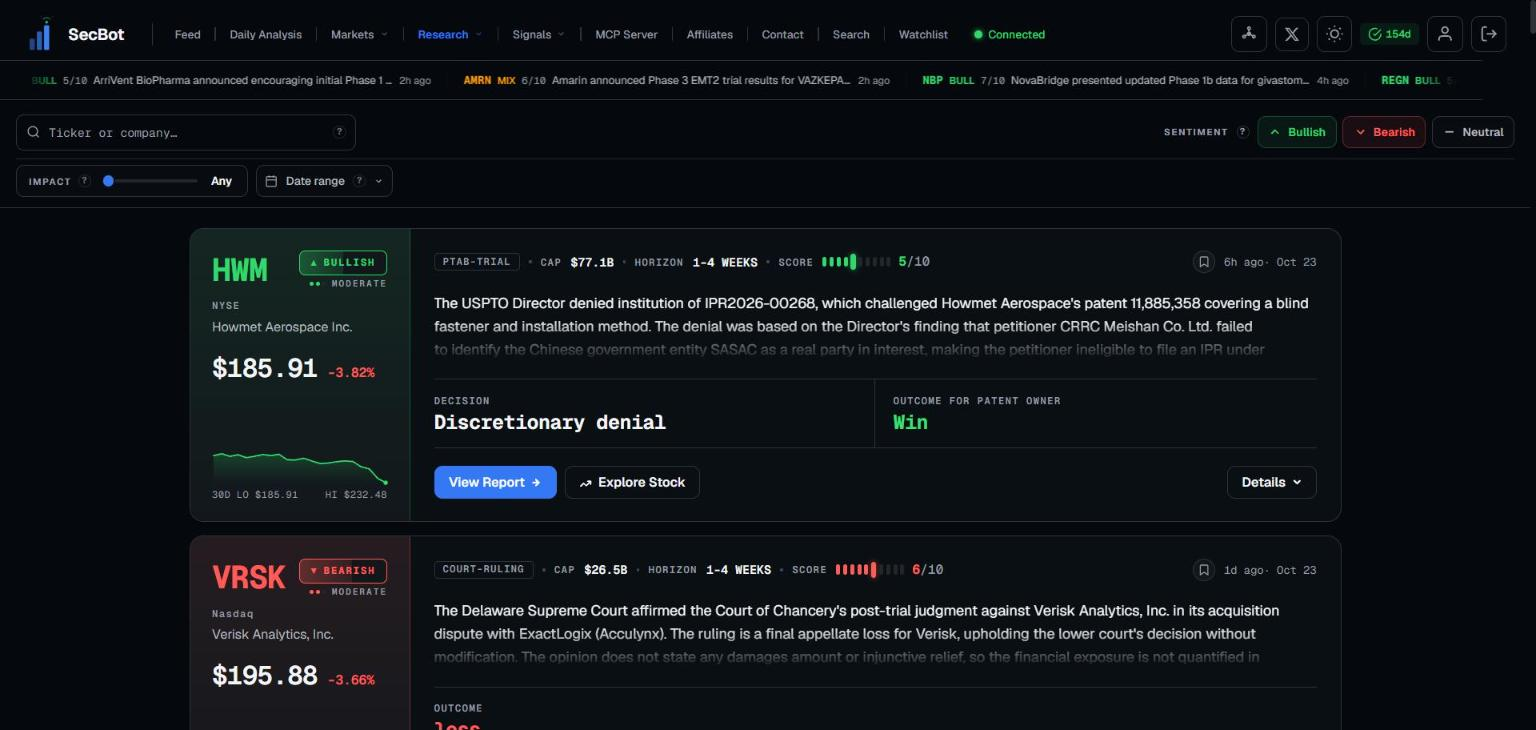 Report cards for recent legal decisions involving listed companies.
What it covers
The page pulls from three sources, and these reports live here rather than in the main feed:
- Court rulings from federal and state courts.
- USITC Section 337 notices — import-ban cases at the U.S. International Trade Commission.
- PTAB decisions — patent trials at the USPTO's Patent Trial and Appeal Board.
There are no case-type buckets. Any ruling where a listed company is a party can show up. Procedural orders — scheduling, protective orders, extensions, counsel appearances, pro hac vice admissions — are filtered out so you only see decisions with substance.
Which courts
- Federal courts — district, appellate (including the Federal Circuit), bankruptcy, the Court of International Trade and the Court of Federal Claims, from the official federal court opinions collection.
- The U.S. Supreme Court.
- State courts — Delaware Chancery, Supreme and Superior Courts, plus the supreme courts of New Jersey, Massachusetts, Illinois, Florida, Pennsylvania, Georgia, Washington, Michigan and Ohio.
New York, California and Texas state courts are not covered.
What each card shows
- One matched company. A ruling naming two listed companies produces a report for each. Share classes such as GOOG and GOOGL collapse into one. Companies are matched from the party names and verified before a report is written, and the same ruling never alerts twice.
- A sentiment read — bullish, bearish, mixed or neutral — and an impact score from 1 to 10 for that company.
- The ruling date, which is the date the card is filed under.
- A link to the official document: View court ruling, View ITC notice or View PTAB decision.
ITC and PTAB cards also carry a details grid; see ITC & PTAB.
Filtering and navigation
- Search by ticker or company name. Press
/to jump to the search box. - Sentiment toggles — bullish, bearish and mixed are on by default; neutral is hidden.
- Minimum impact from 1 to 10, and a date range.
- Filters are saved in the URL, so you can bookmark or share a filtered view.
- Keyboard:
j/kmove between cards,Enteropens details,oopens the report,1–5set sentiment,dtoggles density,ttoggles theme,?lists shortcuts. - Cards load 50 at a time with Load More. Signed-in users get live updates, with an "N new reports" banner when fresh cards arrive.
How often it updates
- Federal and state courts are checked every 30 minutes.
- USITC is checked every hour. Notices appear about 3–5 days after the Commission acts, because they are published through the Federal Register.
- PTAB is checked every 3 hours.
TIP
Reports under 24 hours old are hidden for non-subscribers. See Plans & access.
Alerts
To get these pushed to you, add a rule in the Court Judgements alert category. It has three events — Court ruling, ITC Section 337 and PTAB patent trial — with sentiment and minimum impact score filters. See Alert rules.
Regulator enforcement actions (SEC, DOJ, FTC, FINRA and others) don't have a page of their own: find them in Search with the Enforcement filter, or get them pushed with the Enforcement Actions alert category.
Related: ITC & PTAB.