
Alert rules
Alerts come from rules you build on the Watchlist page's Alerts tab. Each rule says which tickers to watch and which events on them are worth a message. You can have up to 20 rules, and each one can be switched on or off, edited, or deleted.
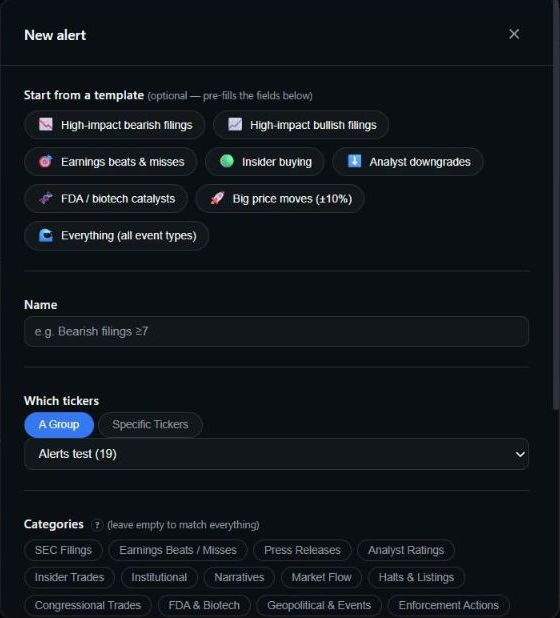 The New alert form: start from a template, then pick tickers and categories.
Start from a template
Click + New alert, or pick a template under Start from a template. A template fills in the form, and you can change anything before you save:
- High-impact bearish filings — SEC filings, bearish, impact score 7 or higher.
- High-impact bullish filings — the same, bullish.
- Earnings beats & misses
- Insider buying — open-market insider buys.
- Analyst downgrades
- FDA / biotech catalysts
- Big price moves (±10%) — a daily move of 10% or more, up or down.
- Everything (all event types)
Building a rule
The New alert form has these parts:
- Name — up to 80 characters, for example "Bearish filings ≥7".
- Which tickers — A group (pick one of your ticker groups, or create one right there) or Specific tickers (up to 30).
- Categories — the kinds of event to watch. Pick one or several. Leave it empty to match every category.
- Specific events — optional. Narrows the chosen categories to exact event types, such as only insider buys or only downgrades.
- Sentiment — bullish, bearish, neutral or mixed. Only offered when a selected category carries a sentiment read.
- Minimum impact score — 1 to 10. Only offered when a selected category is scored. A floor of 7 skips most routine news.
- Form types and 8-K items — appear when SEC Filings is selected. A dot marks routine forms that don't get an impact score.
- Minimum daily move — appears when Price Moves is selected. See Price moves below.
Sentiment and score filters are strict
If a rule sets a sentiment or a minimum impact score, an event with no sentiment or score can't match it. Analyst ratings, congressional trades and halts don't carry a score, for example. Put those categories in their own rule rather than mixing them into a score-filtered one.
The 18 categories
| Category | Specific events you can pick | Sentiment | Score |
|---|---|---|---|
| SEC Filings | Pick form types and 8-K items instead | ✓ | ✓ |
| Earnings Beats / Misses | Beat, Miss, In line | ✓ | ✓ |
| Press Releases | — | ✓ | ✓ |
| Analyst Ratings | Upgrade, Downgrade, Initiation, Price target raised, Price target lowered | ||
| Insider Trades | Buy (open market), Sell (open market) | ✓ | ✓ |
| Institutional | New position, Increased / doubled, Trimmed / near exit, Exited, Activist 13D, Passive 13G | ✓ | ✓ |
| Narratives | Leader, Laggard, Catch-up trade | ||
| Market Flow | Dark pool, Failures to deliver, Unusual options, Reg SHO threshold entry/exit, Short interest swing | ||
| Halts & Listings | News halt (T1/T2), Regulatory halt (H4/H9/H11/T12), SEC suspension (H10), Volatility pause (LUDP/T5), Resumption, Listing status change (FSI / delisting) | ||
| Congressional Trades | Buy, Sell | ||
| FDA & Biotech | Approval, Recall, PDUFA date, Complete Response Letter, AdCom meeting, Breakthrough designation, Fast track, Priority review, Clinical hold | ✓ | |
| Geopolitical & Events | — | ||
| Enforcement Actions | SEC, DOJ, FTC, FINRA, EU Commission, EMA | ||
| Court Judgements | Court ruling, ITC Section 337, PTAB patent trial | ✓ | ✓ |
| Government Contracts | Contract award | ✓ | ✓ |
| Trading Signals | PEAD (long), PEAD (short), Insider cluster, Insider buy, Daily gap | ||
| Reddit Sentiment | Bullish shift, Bearish shift, Mention spike | ✓ | |
| Price Moves | Set a minimum daily move instead |
A few things are filtered out before any rule sees them. Routine insider paperwork (option exercises, stock awards, tax withholding) never alerts. Press releases alert once SecBot has written the report on them. Analyst consensus snapshots alert only when the consensus actually shifts up or down.
Price moves
Price Moves alerts are opt-in. An "everything" rule does not include them; you have to select the category. Set a Minimum daily move of at least 5%. The alert fires when the ticker moves that much up or down against the prior close, then fires again at each further step. With 5%, that's 5%, 10%, 15% and so on.
Managing rules
- On/off switch — turn a rule off without deleting it.
- Edit and Delete — on each rule card. Editing a rule also clears an auto-pause.
- Auto-paused — if a rule fires more than 15 times inside 10 minutes, SecBot pauses it and tells you on Telegram. Narrow the rule, then click Resume.
- One message per event — if several of your rules match the same event, you get one alert, not several.
- Deleting a group that a rule still uses is blocked. Change or delete the rule first.
Next: choose where alerts go in Delivery & quiet hours.