Delivery & quiet hours
Your rules decide what triggers an alert. The Delivery & Quiet Hours card, at the bottom of the Watchlist page's Alerts tab, decides where alerts go and when Telegram should stay silent. Click Save after you change anything.
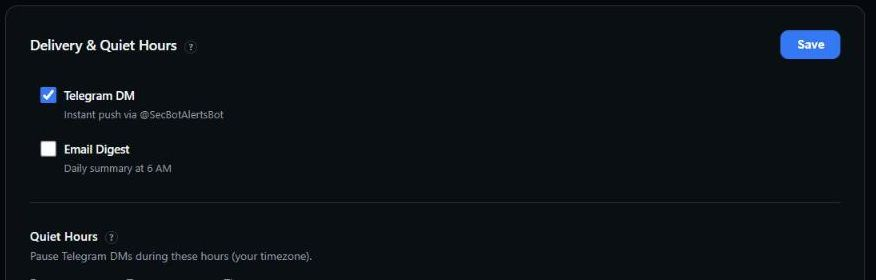 Pick your channels and set the hours Telegram stays quiet.
Where alerts go
There are two channels. You can use one or both:
- Telegram DM — an instant push from @SecBotAlertsBot. This is on by default, but nothing arrives until you link the bot.
- Email Digest — one email with the day's alerts, sent at 6 AM in the timezone you choose below. This is off by default.
If both are off, or Telegram is on but not linked and the digest is off, your alerts have nowhere to go. The Alerts tab shows a reminder when that happens.
Quiet hours
Set From and To times and pick your Timezone. Telegram DMs that match during that window each day are skipped. They are not re-sent afterwards, and they show as skipped in your alert log. Leave the times blank to get alerts around the clock.
Quiet hours apply to Telegram only. The email digest is not affected.
Get the timezone right
Quiet hours and the 6 AM digest both follow the timezone you pick here, not the server's. The default is New York time.
Pausing everything for a while
To stop Telegram alerts for a while without changing your settings, send /mute to the bot and /unmute when you're back. Alerts that match while you're muted are not sent later. To stop a single rule, use its on/off switch on the Alerts tab.
How much gets through
You control the volume with your rules, not with a global filter. There are no per-ticker overrides or global severity settings. To hear less, tighten the rules themselves:
- Raise a rule's Minimum impact score.
- Narrow it to Specific events, such as only open-market buys.
- Split names into groups, and give the names you follow most closely a broader rule than the rest.
SecBot also paces Telegram delivery. If a burst arrives at once, some alerts may be held back (shown as throttled in the alert log), and a rule that fires more than 15 times in 10 minutes is auto-paused.
Next: review what's been sent in the Alert log.