Dashboard tour
Here's the whole screen in one pass, so you know where everything lives before you start clicking.
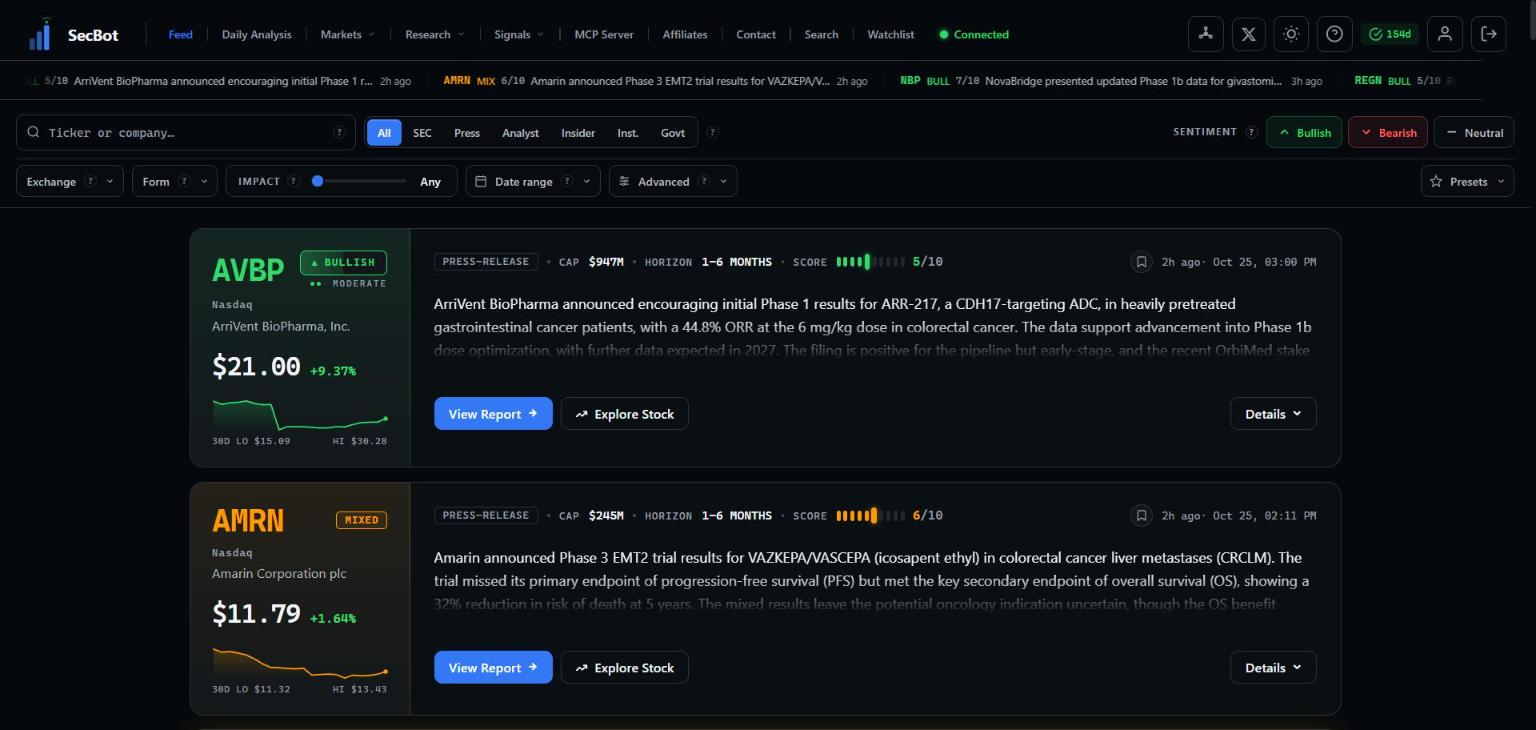 The dashboard opens on the Intelligence Feed.
The top bar
Your main navigation runs across the top:
- Feed — the default view, a live stream of scored events.
- Daily Analysis — the pre-market and post-close briefings. See the daily brief.
- Markets — Narratives, Market Galaxy, Heatmap, Market Flow, Halts & Listings, Institutions, Earnings Analysis, Earnings Beats / Misses, and Analyst.
- Research — Congressional, Insider Tracker, Biotech, Drug Reports, Geopolitical, and Court Judgements.
- Signals — Today's Edge, PEAD, Daily Gap, and Report Analytics.
- MCP Server — connect your own tools to SecBot data. See Connect your own tools.
- Affiliates — the referral program. See Affiliate program.
- Contact, Search (look up any company, filing, or event; see Search), and Watchlist (your tickers, groups and alert rules; see Your watchlist).
On the right you'll find a Connected indicator (it confirms the feed is live and updating), a display-density toggle, a light/dark theme switch, a help button, the days-remaining badge for your subscription, and your account menu.
The ticker strip
Just under the nav, a running strip scrolls the latest scored headlines with their tickers and impact scores. It's a quick pulse of what's hitting right now.
Filters and sorting
Above the feed sits the control bar:
- A search box for jumping to a ticker or company.
- Source chips — All, SEC, Press, Analyst, Insider, Inst., Govt — to narrow the feed to one kind of event.
- Sentiment toggles — Bullish, Bearish, Neutral — to show only the read you want.
- A filter row with Exchange, Form type, an Impact slider, Date range, and Advanced options.
- Presets to save a filter combination and load it again in one click.
All of this is covered in Filters & presets.
The cards
The feed itself is a column of cards. Each one is a single event: the ticker, the company, its current price and move, a small 30-day chart, the event type, an impact score, and a written summary of what happened and why it matters. Two buttons take you deeper — View Report for the full breakdown and Explore Stock for the ticker page.
Learn to read one quickly in Reading the cards.
Ready to set things up? Spend your first 10 minutes here.